World of Warcraft Guides, Lore, Addons & News – NoobToBoss From Azeroth's Newbie to Champion – World of Warcraft Guides
This comprehensive WoW Classic Paladin Macros Guide provides you with the most useful macros to enhance your gameplay across all three Paladin specializations. Whether you’re healing raids, tanking dungeons, or dealing damage in PvP, these macros will streamline your rotation and improve your efficiency.
Why Use Macros as a Paladin?
Macros are powerful tools that combine multiple actions into a single button press, saving action bar space and reducing the complexity of your gameplay. For Paladins specifically, macros help with:
Key Benefits:
- Combine seal casting with judgement for smoother rotations
- Enable mouseover healing without targeting players
- Quick access to emergency cooldowns like Divine Shield
- Efficient blessing management for your party
- Seamless weapon swapping for Protection Paladins
- Downranking spells to conserve mana
The macro system in WoW Classic uses a more restrictive framework compared to Vanilla 1.12, meaning some complex Lua scripts no longer work. However, the modern macro system still offers plenty of functionality to enhance your Paladin gameplay.
How to Create and Use Macros
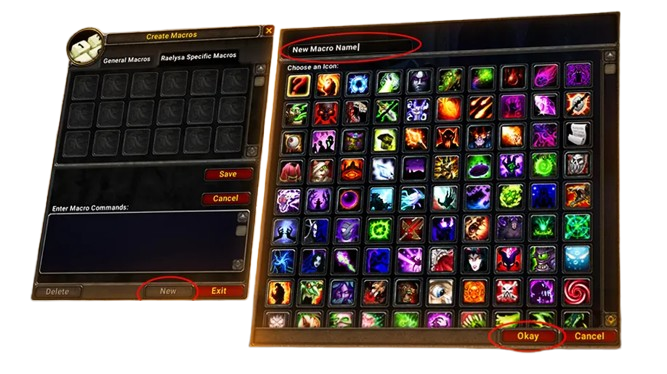
Before diving into specific macros, here’s how to set them up:
Creating a Macro:
- Type
/macroor pressEscand click “Macros” - Click “New” to create a macro
- Choose an icon and give it a name
- Paste the macro text into the box
- Drag the macro to your action bar
Important Macro Commands:
#showtooltip– Shows the spell tooltip on your action bar/cast– Casts a spell or ability/castsequence– Casts spells in a specific order/startattack– Begins auto-attacking/stopcasting– Interrupts your current cast/cancelaura– Removes a buff from yourself[@mouseover]– Targets whoever your mouse is hovering over
Now let’s explore the best macros for each Paladin role.
Essential Combat Macros
These macros work for all Paladin specs and improve your basic combat functionality.
Auto-Attack Starter
This simple macro ensures you always start auto-attacking when engaging enemies. Safe to spam without stopping your attacks.
#showtooltip Attack
/cleartarget [dead][help]
/targetenemy [noexists]
/startattack [harm]
What it does: Clears dead or friendly targets, finds the nearest enemy if you have no target, and starts auto-attacking hostile targets.
Seal and Judgement Combo
Combine your seal with Judgement for a smoother rotation. This macro casts Judgement on enemies and reapplies your seal.
#showtooltip Judgement
/cast [@target,harm] Judgement
/cast Seal of Righteousness
/startattack [@target,harm]
Usage: Press once to judge, press again to reapply your seal. Replace Seal of Righteousness with Seal of Command, Seal of Wisdom, or any other seal you prefer.
Castsequence Seal Rotation (Retribution)
For Retribution Paladins, this macro automates your seal twisting rotation for maximum DPS.
#showtooltip
/cleartarget [dead][help]
/targetenemy [noexists]
/startattack [harm]
/castsequence reset=30 Seal of the Crusader, Judgement, Seal of Command, Judgement
What it does: Applies Seal of the Crusader for the debuff, judges it, then applies Seal of Command for damage and judges again. Resets after 30 seconds or when sequence completes.
Pro Tip: Replace Seal of Command with Seal of Righteousness if using a fast one-handed weapon and shield.
Hammer of Justice Interrupt
Cast Hammer of Justice instantly by interrupting your current cast. Essential for PvP and dungeon interrupts.
#showtooltip Hammer of Justice
/stopcasting
/cast Hammer of Justice
/startattack
Usage: Stops whatever you’re casting and immediately stuns your target. The /startattack ensures you don’t stop auto-attacking.
Exorcism on Undead/Demons Only
Cast Exorcism only against valid targets (Undead and Demons) to avoid wasting cooldowns.
#showtooltip Exorcism
/cast [harm] Exorcism
/startattack
Note: In Classic, you can attempt to cast Exorcism and it will only go off if the target is valid. The macro ensures you also start attacking.
Holy Paladin Healing Macros
Healing macros are essential for efficient raid and dungeon healing. Mouseover macros let you heal without changing targets.
Mouseover Holy Light
Heal whoever your mouse is hovering over without losing your current target. Works on raid frames, party frames, and players in the world.
#showtooltip Holy Light
/cast [@mouseover,help,nodead][@target,help,nodead][@player] Holy Light
How it works: Tries to heal your mouseover target first, then your current target if friendly, then yourself if no valid target exists.
Mouseover Flash of Light
Same functionality as above but for Flash of Light, your faster but smaller heal.
#showtooltip Flash of Light
/cast [@mouseover,help,nodead][@target,help,nodead][@player] Flash of Light
Usage: Keep your main target (usually the tank) selected while healing other raid members by hovering your mouse over their frames.
Downranking Holy Light
Conserve mana by using lower ranks of Holy Light. This macro lets you access multiple ranks with modifier keys.
#showtooltip Holy Light
/cast [mod:ctrl] Holy Light(Rank 4); [mod:shift] Holy Light(Rank 6); [mod:alt] Holy Light(Rank 8); Holy Light
How to use:
- Normal press: Max rank
- Hold Ctrl: Rank 4
- Hold Shift: Rank 6
- Hold Alt: Rank 8
Adjust ranks based on your level and healing needs. Lower ranks are more mana efficient for smaller heals.
Downranking Flash of Light
Same principle as above for Flash of Light.
#showtooltip Flash of Light
/cast [mod:ctrl] Flash of Light(Rank 1); [mod:shift] Flash of Light(Rank 3); [mod:alt] Flash of Light(Rank 5); Flash of Light
Mouseover Cleanse
Quickly remove diseases, poisons, and magic effects from raid members.
#showtooltip Cleanse
/cast [@mouseover,help,nodead][@target,help,nodead][@player] Cleanse
Why it’s important: Cleanse is one of the most powerful dispels in the game since Paladins can remove three different debuff types. This macro makes it easy to use.
Divine Favor + Holy Light Burst
Combine Divine Favor with Holy Light for guaranteed critical heals in emergencies.
#showtooltip Holy Light
/cast Divine Favor
/cast [@mouseover,help,nodead][@target,help,nodead][@player] Holy Light
Usage: Press once for a guaranteed crit heal. Perfect for tank saves or burst healing situations.
Lay on Hands Emergency
Cast Lay on Hands on mouseover targets for emergency tank saves.
#showtooltip Lay on Hands
/stopcasting
/cast [@mouseover,help,nodead][@target,help,nodead][@player] Lay on Hands
Pro Tip: Keep a mana potion ready since Lay on Hands drains all your mana.
Protection Paladin Tanking Macros
Tank macros help you manage threat, swap weapons, and use defensive cooldowns effectively.
Weapon Swap Macro
Quickly swap between your two-handed weapon and one-handed weapon with shield. Replace weapon names with your actual gear.
#showtooltip
/equipslot [equipped:Shield] The Unstoppable Force
/equipslot [noequipped:Shield] Aegis of the Blood God
/equipslot [noequipped:Shield] The Immovable Object
/targetenemy [noexists][dead][help]
/startattack [@target,harm]
What it does: If you have a shield equipped, it swaps to your two-handed weapon. If you don’t have a shield, it equips your one-handed weapon and shield. Also targets enemies automatically.
Important: Update the weapon names to match your actual items or this macro won’t work.
Holy Shield with Righteous Fury Check
Ensures Righteous Fury is always active when using Holy Shield.
#showtooltip Holy Shield
/cast [nobuff:Righteous Fury] Righteous Fury
/cast Holy Shield
/startattack
Why it matters: Righteous Fury is essential for threat generation. This macro prevents you from forgetting to activate it.
Consecration + Seal of Righteousness
Optimize your AoE threat generation by combining abilities.
#showtooltip Consecration
/cast Consecration
/cast Seal of Righteousness
/startattack
Usage: Press once to drop Consecration and ensure your Seal of Righteousness is active for additional threat.
Divine Shield Cancel
Cast and cancel Divine Shield with the same button. Useful for removing debuffs without losing threat for too long.
#showtooltip Divine Shield
/cancelaura Divine Shield
/cast Divine Shield
How it works: First press casts Divine Shield, second press removes it. Cancel early to resume tanking after cleansing debuffs.
Warning: Divine Shield drops all threat, so use carefully in group content.
Blessing of Protection Save
Cast Blessing of Protection on party members to save them, or on yourself as Divine Protection.
#showtooltip Blessing of Protection
/cast [help][@mouseover,help,nodead] Blessing of Protection; Divine Protection
Smart targeting: Casts Blessing of Protection on friendly targets or mouseover allies. If targeting an enemy or nothing, casts Divine Protection on yourself.
Retribution Paladin DPS Macros
Maximize your damage output with these Retribution-focused macros.
Crusader Strike Auto-Attack
Never miss auto-attacks between ability casts.
#showtooltip Crusader Strike
/cast Crusader Strike
/startattack
Simple but effective: Ensures every Crusader Strike (if talented) maintains your auto-attack.
Wing Clip for Kiting
Use Wing Clip… wait, that’s a Hunter ability! Paladins don’t have this, but you can use Hammer of Justice for similar purposes.
Avenging Wrath Burst
Activate all offensive cooldowns at once for maximum burst damage.
#showtooltip Avenging Wrath
/cast Avenging Wrath
/use 13
/use 14
/cast Seal of Command
What it does: Activates Avenging Wrath, uses both equipped trinkets (slots 13 and 14), and ensures your damage seal is active.
Note: Avenging Wrath is a TBC ability and not available in Classic Era. Remove that line if playing Vanilla.
Seal Twist Macro (Advanced)
For advanced players practicing seal twisting: judge one seal and immediately cast another to get benefits of both for a brief moment.
#showtooltip Judgement
/cast Judgement
/cast Seal of Command
Requires: Extremely fast reaction time and practice. Cast Seal of the Crusader, judge it, then use this macro to twist into Seal of Command.
Utility and Quality of Life Macros
These macros improve your overall Paladin experience across all activities.
Blessing Modifier Macro
Cast regular blessings or greater blessings with modifier keys to save action bar space.
#showtooltip Blessing of Might
/cast [mod:shift] Greater Blessing of Might; Blessing of Might
Usage: Normal press gives single-target Blessing of Might. Hold Shift for Greater Blessing of Might on the same button.
Create similar macros for Blessing of Wisdom, Blessing of Kings, and other blessings.
Mouseover Blessing of Freedom
Quickly free allies from movement impairing effects.
#showtooltip Blessing of Freedom
/cast [@mouseover,help,nodead][@target,help,nodead][@player] Blessing of Freedom
PvP essential: Helps teammates escape roots, snares, and slows without losing your current target.
Aura Rotation Macro
Cycle through different auras with a single button press.
#showtooltip
/castsequence Devotion Aura, Retribution Aura, Concentration Aura
What it does: Each press switches to the next aura. Useful when you need to change auras frequently.
Resistance Aura Rotation
Similar to above but cycles through resistance auras for specific encounters.
#showtooltip
/castsequence Fire Resistance Aura, Frost Resistance Aura, Shadow Resistance Aura
Usage: Switch resistance auras based on encounter mechanics without cluttering your action bar.
Mount + Crusader Aura
Automatically activate Crusader Aura when mounting for faster travel.
#showtooltip
/cast [nomounted] Crusader Aura
/cast [nomounted] Summon Warhorse
/dismount [mounted]
Note: Crusader Aura is a TBC ability. In Classic Era, this macro won’t work as written. Use it in TBC Classic only.
Bubble Hearth (Classic Meme)
The legendary Paladin escape macro that defines the class.
#showtooltip Hearthstone
/cast Divine Shield
/use Hearthstone
How it works: Activates Divine Shield and starts hearthing. You become immune to all damage and crowd control, guaranteeing your escape.
Meme status: Paladins are famous (or infamous) for this move. Use responsibly!
Cancel Blessing of Protection
Remove Blessing of Protection from yourself if you need to resume attacking.
#showtooltip Blessing of Protection
/cancelaura Blessing of Protection
/cast [@target,help,nodead] Blessing of Protection
Use case: If someone accidentally casts Blessing of Protection on you while tanking, this removes it instantly.
Divine Intervention Emergency
Save a healer or important raid member with Divine Intervention on mouseover.
#showtooltip Divine Intervention
/cast [@mouseover,help,nodead][@target,help,nodead] Divine Intervention
Important: Divine Intervention kills you to save another player. Use only in wipe situations to preserve a soulstone or save your main healer.
Advanced Macro Techniques
For experienced players wanting to push their macros further.
Target of Target Healing
Automatically heal your target’s target, useful when targeting bosses but wanting to heal the tank.
#showtooltip Holy Light
/cast [target=targettarget,help,nodead] Holy Light; [@player] Holy Light
Scenario: You’re targeting the boss to monitor its casts, but your macro automatically heals whoever the boss is attacking (usually the tank).
Focus Target Judgement
Judge your focus target without changing your current target.
#showtooltip Judgement
/cast [@focus,harm,nodead][@target,harm] Judgement
PvP usage: Set a specific enemy as your focus (usually a healer), then judge them while maintaining your current target.
Stopcasting + Instant Cast
Cancel your current cast to use an instant-cast ability immediately.
#showtooltip Hammer of Justice
/stopcasting
/cast [@target,harm] Hammer of Justice
Why it matters: If you’re casting Holy Light but need to interrupt urgently, this cancels your cast for an immediate stun.
Smart Resurrection
Resurrect allies with mouseover or normal targeting.
#showtooltip Redemption
/cast [@mouseover,dead][@target,dead][@targettarget,dead] Redemption
Convenience: Hover over dead players’ corpses or raid frames to resurrect without clicking them first.
Macro Limitations in WoW Classic
Understanding what macros cannot do helps you set realistic expectations.
Cannot Do:
- Cast multiple spells simultaneously (Global Cooldown prevents this)
- Use complex Lua scripting (removed in modern Classic client)
- Automate entire rotations (castsequence has limitations)
- Check for spell cooldowns conditionally
- Make gameplay decisions for you
Can Do:
- Combine spells with the same GCD into smart sequences
- Enable mouseover casting for all abilities
- Add modifier keys for multiple abilities on one button
- Automatically start attacks with spell casts
- Cancel auras and buffs when needed
The key to good macro usage is understanding these limits and working within them creatively.
Tips for Creating Your Own Macros
Want to customize macros for your specific needs? Follow these guidelines:
✅ Always use #showtooltip – Shows cooldown timers on your action bar
✅ Test extensively – Make sure your macro works before using in raids
✅ Keep it simple – Complex macros often break or behave unexpectedly
✅ Use descriptive names – Name your macros clearly so you remember what they do
✅ Save action bar space – Combine similar abilities with modifiers
✅ Consider lag – Some macros work poorly with high latency
❌ Don’t spam castsequence – These can break easily if interrupted
❌ Avoid overly long sequences – Shorter macros are more reliable
❌ Don’t rely on macros alone – Manual play is sometimes better
Common Macro Mistakes to Avoid
Learn from these common errors:
Mistake 1: Wrong Spell Names
/cast holly light
❌ Incorrect spelling breaks the macro. Use exact spell names from your spellbook.
Mistake 2: Global Cooldown Conflicts
/cast Holy Light
/cast Flash of Light
❌ Both spells share GCD, so only the first will cast. Use conditionals instead.
Mistake 3: Missing [@mouseover,help,nodead]
/cast [@mouseover] Holy Light
❌ Will try to heal enemies. Always include ,help,nodead for healing spells.
Mistake 4: Forgetting /startattack
/cast Crusader Strike
✅ Add /startattack so you don’t stop auto-attacking between abilities.
Mistake 5: Equipment Names
/equipslot [equipped:Shield] Sword Name Here
❌ If your sword name is wrong or changes, the macro breaks. Keep weapon swap macros updated.
Frequently Asked Questions
Do macros work the same in WoW Classic as in Retail?
Can I use macros to automate my entire rotation?
Why isn’t my seal and judgement macro working?
What’s the best way to heal with macros?
Can I use macros to automatically dispel debuffs?
How many macros can I create?
Why does my weapon swap macro not work?
Can I make a macro to automatically buff the entire raid?
What’s the character limit for macros?
Do macros affect my game performance?
Conclusion
Mastering Paladin macros in WoW Classic significantly improves your effectiveness across all three specs. Whether you’re a Holy Paladin using mouseover heals to top your healing meters, a Protection Paladin managing threat with weapon swaps, or a Retribution Paladin optimizing your seal twisting rotation, these macros streamline your gameplay and free up mental bandwidth for better decision-making.
Key Takeaways:
- Start with simple mouseover macros for healing and utility
- Use modifier keys to save action bar space
- Combine abilities that naturally flow together in your rotation
- Test all macros thoroughly before using in important content
- Update weapon swap macros whenever you get new gear
- Remember that macros enhance gameplay but don’t replace skill
The macros in this guide cover most situations Paladins encounter in WoW Classic Era. Experiment with these templates, adjust them to your playstyle, and create your own variations as you become more comfortable with the macro system.
For more Paladin guides, check out our WoW Classic Paladin Guide, or dive into spec-specific content like Holy Paladin PvE, Protection Paladin Tanking, and Retribution PvE.
May the Light guide your button presses! ⚔️