World of Warcraft Guides, Lore, Addons & News – NoobToBoss From Azeroth's Newbie to Champion – World of Warcraft Guides
This comprehensive WoW Classic Mage Macros Guide provides you with every essential macro to maximize your efficiency in PvE raids, PvP combat, and AOE grinding. Macros are command shortcuts that combine multiple actions into a single button press, dramatically improving your reaction time and freeing up valuable action bar space. Whether you’re interrupting enemy casters, managing crowd control, or executing perfect DPS rotations, the right macros transform good Mages into great ones.
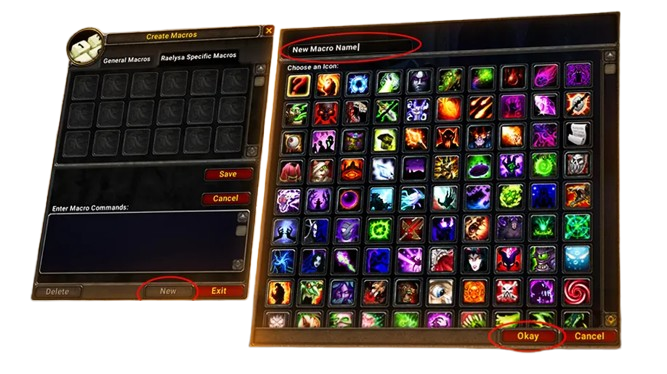
Understanding Mage Macros
Macros in WoW Classic allow you to execute complex command sequences with a single keystroke. For Mages, this means instant spell cancellations for faster Counterspell timing, automatic trinket activation during burst windows, and seamless crowd control management without losing your current target.
The Classic macro system differs from private servers and modern WoW. Focus targeting isn’t available, and certain script functions are restricted. However, the macros presented here work perfectly in WoW Classic Era and provide significant advantages when used correctly.
General Utility Macros
Spammable Wand Macro
/cast !Shoot
Purpose: This simple but crucial macro lets you spam your wand attack button without accidentally cancelling the channel. The exclamation point (!) prevents the command from turning off your wand when pressed multiple times.
Usage: Bind this to an easily accessible key and spam it while moving between targets. Essential for conserving mana during leveling and for finishing low-health enemies in raids.
🎯 Tip: Always keep your wand updated. A good wand can represent 10-15% of your overall damage during long fights where mana conservation matters.
One-Button Buffing Macro
#showtooltip
/cast [button:2] Ice Armor; Arcane Intellect
Purpose: Left-click casts Arcane Intellect, right-click casts Ice Armor or Frost Armor. Saves an action bar slot while keeping both buffs accessible.
Usage: Before raids or dungeons, use this to quickly buff yourself. You can modify it to include Mage Armor if you’re Fire or Arcane spec.
Smart Conjure Macro
#showtooltip
/cast [mod:shift] Conjure Food; [mod:ctrl] Conjure Mana Gem; Conjure Water
Purpose: Automatically conjures the highest rank of water (default), food (shift), or mana gems (ctrl) without needing separate buttons for each rank.
Usage: Essential for raid preparation. Hold shift to create stacks of food, ctrl for your Conjure Mana Ruby, or press normally for water. This macro always uses your maximum rank, so you never accidentally create lower-rank consumables.
Potion and Bandage Macro
/use [mod:shift] Heavy Runecloth Bandage; [mod:ctrl] Major Mana Potion; Major Healing Potion
Purpose: Combines your potions and bandages into one button. Default click uses health potion, ctrl for mana potion, shift for bandages.
Usage: Adjust the item names as you level up. This macro saves multiple action bar slots and keeps emergency consumables accessible without cluttering your bars.
⚠️ Important: Remember to update the item names when you upgrade to better potions and bandages.
PvE Raiding Macros
Burst Damage Macro (All Specs)
#showtooltip
/cast Presence of Mind
/cast Arcane Power
/use 13
/use 14
/cast Pyroblast
Purpose: Activates every offensive cooldown simultaneously for maximum burst damage. This macro pops Presence of Mind (instant cast), Arcane Power (damage boost), both trinkets (slots 13 and 14), then instantly casts Pyroblast.
Usage: Perfect for execute phases or when raid leaders call for burst. Works for Fire Mages. Frost Mages can replace Pyroblast with Frostbolt.
Frost Version:
#showtooltip
/cast Presence of Mind
/cast Arcane Power
/use 13
/use 14
/cast Frostbolt
💡 Pro Tip: Time this macro with raid buffs and debuff stacks for maximum effect. In Molten Core, wait for full Curse of Elements and Curse of Shadow before using your burst.
Modifier Frostbolt Macro
#showtooltip
/cast [mod:ctrl] Frostbolt(Rank 1); Frostbolt
Purpose: Casts maximum rank Frostbolt normally, or Rank 1 Frostbolt when holding ctrl. Rank 1 is useful for maintaining Winter’s Chill debuff stacks without draining mana.
Usage: In raids where you’re assigned Winter’s Chill duty, use ctrl+click to cast cheap Rank 1 frostbolts that build stacks without significant mana cost. Switch to normal casts when the debuff is fully stacked.
Trinket with Fireball/Frostbolt
#showtooltip Frostbolt
/use 13
/use 14
/cast Frostbolt
Purpose: Activates both trinkets every time you cast Frostbolt. This ensures trinkets are used on cooldown without requiring separate keybinds.
Usage: Only use this macro with trinkets that have damage-boosting effects (like Talisman of Ephemeral Power or Zandalarian Hero Charm). Don’t use it with trinkets that have situational active abilities you want to control manually.
🎯 Alternative: Replace Frostbolt with Fireball or Scorch depending on your raid spec.
Evocation Weapon Swap Macro
#showtooltip Evocation
/equip Quel'Serrar
/cast Evocation
Purpose: Automatically equips your highest spirit weapon before channeling Evocation, maximizing mana regeneration. After the channel completes, manually re-equip your normal weapon.
Usage: Replace “Quel’Serrar” with whatever high-spirit weapon you have available. The spirit bonus significantly increases the mana returned by Evocation.
⚠️ Note: You must manually re-equip your raid weapon after Evocation completes. Consider adding a second macro for this:
/equip Staff of Dominance
PvP Macros
Instant Counterspell Macro
#showtooltip Counterspell
/stopcasting
/cast Counterspell
Purpose: Instantly interrupts your current cast and fires Counterspell. Critical for shutting down enemy heals or damage casts without delay.
Usage: Essential for PvP. When you see an enemy priest casting Greater Heal or a warlock channeling a fear, hit this macro immediately. The /stopcasting command prevents your Frostbolt cast from delaying the interrupt.
🏆 Pro Tip: Bind this to an easily accessible key like ‘R’ or a mouse button for instant reaction. A 0.5 second delay in interrupting a heal can lose you the match.
Polymorph Mouseover Macro
#showtooltip Polymorph
/stopcasting
/cast [@mouseover, harm, nodead] [harm] Polymorph
Purpose: Casts Polymorph on whatever enemy your mouse is hovering over without changing your current target. If you’re not hovering over anything, it polymorphs your current target.
Usage: Invaluable in battlegrounds and world PvP where you need to sheep one target while focusing damage on another. Hover over the enemy healer’s raid frame and hit your polymorph key while staying targeted on your kill target.
Instant Blink Macro
#showtooltip Blink
/stopcasting
/cast Blink
Purpose: Immediately cancels your current cast and blinks away. The difference between this and regular Blink can be life or death when escaping Warriors or Rogues.
Usage: Use this when you need to escape immediately. The /stopcasting ensures there’s no delay from spell queue. Perfect for breaking out of melee range or dodging incoming Pyroblasts.
Ice Block Toggle Macro
#showtooltip Ice Block
/stopcasting
/cast Ice Block
/cancelaura Ice Block
Purpose: First press casts Ice Block, second press immediately cancels it. Useful for dropping debuffs instantly or baiting enemy cooldowns.
Usage: Double-tap this macro to quickly remove dangerous debuffs like Viper Sting or to fake out enemies who are waiting for your Ice Block to end. Be careful not to accidentally cancel early and die.
⚠️ Warning: Practice this macro before using it in important PvP situations. Accidentally cancelling Ice Block too early is a common mistake.
Cold Snap Reset Macro
#showtooltip Cold Snap
/stopcasting
/cast Cold Snap
Purpose: Instantly resets all Frost cooldowns including Ice Block, Frost Nova, and Ice Barrier. Essential for extended fights where you need Ice Block twice.
Usage: After using Ice Block in an arena or battleground, hit Cold Snap immediately to have it available again. The /stopcasting ensures it fires instantly even mid-cast.
Frost Nova Stopcasting Macro
#showtooltip Frost Nova
/stopcasting
/cast Frost Nova
Purpose: Instantly cancels your current cast and roots all nearby enemies. Critical for peeling melee off yourself or teammates.
Usage: When a Rogue opens on you or a Warrior charges, spam this macro to immediately root them and create distance. Don’t wait for your current Frostbolt to finish.
Remove Curse Mouseover Macro
#showtooltip Remove Lesser Curse
/cast [@mouseover, help, nodead] [help] [@player] Remove Lesser Curse
Purpose: Removes curses from any friendly target your mouse is hovering over. If not hovering, it removes curses from your current target. If you have no target, it removes curses from yourself.
Usage: Hover over party frames in dungeons or raid frames in battlegrounds to quickly dispel curses without changing targets. Saves significant time in group content.
AOE Farming and Leveling Macros
Target Enemy Auto-Attack Macro
#showtooltip Frostbolt
/cleartarget [dead][help]
/targetenemy [noexists]
/cast [harm] Frostbolt
Purpose: Automatically acquires a new enemy target if your current target is dead or friendly, then casts Frostbolt. Perfect for quickly tagging mobs during AOE pulls.
Usage: While AOE farming, spam this to rapidly tag multiple enemies before stacking them. Much faster than manually clicking each mob.
🎯 Pro Tip: You can replace Frostbolt with Rank 1 Fire Blast for instant tagging when competing with other players.
Blizzard at Cursor Macro
#showtooltip Blizzard
/cast [@cursor] Blizzard
Purpose: Instantly places Blizzard at your cursor position without requiring the targeting circle click. Significantly speeds up AOE rotations.
Usage: During AOE grinding, move your cursor to where you want Blizzard and press the button. The spell starts channeling immediately, saving crucial seconds during kiting. This macro is essential for efficient ZF and Maraudon farming.
Alternative Version with Modifier:
#showtooltip
/cast [@cursor, mod:ctrl] Blizzard(Rank 1); [@cursor] Blizzard
This version casts Rank 1 Blizzard when holding ctrl (for mana-efficient slowing) and maximum rank normally.
Cone of Cold Stopcasting Macro
#showtooltip Cone of Cold
/stopcasting
/cast Cone of Cold
Purpose: Immediately cancels your Blizzard channel and casts Cone of Cold. Essential for emergency slows when mobs break through your Blizzard slow.
Usage: When AOE farming and mobs are about to reach you while Blizzard is channeling, hit this macro to immediately slow them without finishing the channel. Buys you time to Blink away and reposition.
Quick Ice Barrier Macro
#showtooltip Ice Barrier
/cast !Ice Barrier
Purpose: The exclamation point prevents the macro from cancelling Ice Barrier if pressed multiple times. You can spam this button without accidentally removing your shield.
Usage: Before every AOE pull, spam this button while running to ensure Ice Barrier is active. Essential for mounted pulling at level 40+.
AOE Grinding Sequence Macro (Beginner)
#showtooltip
/cast Frost Nova
/cast Ice Barrier
Purpose: Combines Frost Nova and Ice Barrier application into one button. When you press it, the macro attempts both spells—whichever is off cooldown will cast.
Usage: Press this when mobs reach you during AOE pulls. If Frost Nova is ready, it roots them. If not, it applies Ice Barrier for protection. Simplifies your rotation while learning.
⚠️ Note: Advanced players typically prefer separate keybinds for better control, but this macro helps beginners manage both defensive tools efficiently.
Advanced PvP Macros
Polymorph Announce Macro
#showtooltip Polymorph
/cast Polymorph
/stopmacro [noexists][dead][help]
/p Sheeping %t - Do NOT break!
Purpose: Casts Polymorph and announces to party chat which target you’re crowd controlling. Prevents teammates from accidentally breaking your sheep.
Usage: Essential in dungeons and group PvP. The macro only announces if you successfully polymorphed a valid target, preventing spam.
Focus Target Polymorph (Workaround)
While Classic doesn’t have native focus functionality, you can simulate it with this macro:
#showtooltip Polymorph
/stopcasting
/assist YourNameHere
/cast Polymorph
Purpose: This macro assists yourself, effectively returning to your “main target” after polymorphing something else. Requires setting up your main target, then using this on adds.
Usage: Target your kill target, then target an add and use this macro. It polymorphs the add, then immediately assists yourself back to your original target. Not perfect, but functional.
Arcane Intellect Buff Cycling Macro
#showtooltip Arcane Intellect
/cast [@mouseover, help, nodead] [@target, help] [@targettarget, help] [@player] Arcane Intellect
Purpose: Intelligently buffs the most appropriate target: mouseover target first, then your target, then your target’s target, then yourself if none of those work.
Usage: Hover over party members’ frames to quickly buff them, or cycle through nearby players by targeting them. Extremely efficient for mass buffing before raids.
Counterspell with Petri Flask Backup
#showtooltip Counterspell
/stopcasting
/cast [mod:shift] Counterspell; Counterspell
/use [mod:shift] Free Action Potion
Purpose: Normal press casts Counterspell. Shift press casts Counterspell AND uses Free Action Potion for breaking roots while interrupting.
Usage: Against Frost Mages in PvP, shift-press this when interrupting to simultaneously break their roots and interrupt their cast. Combines offense and mobility in one action.
Dungeon and Raid Utility Macros
Decurse Mouseover Macro
#showtooltip Remove Lesser Curse
/cast [@mouseover, help, nodead] [help] [@player] Remove Lesser Curse
Purpose: Instantly removes curses from whoever your mouse is hovering over. Priority: mouseover → your target → yourself.
Usage: In Molten Core or during Lucifron fights, hover over raid frames to quickly dispel curses without changing your DPS target. Dramatically speeds up curse removal duty.
Smart Polymorph for Dungeons
#showtooltip Polymorph
/stopcasting
/cast [@mouseover, harm, nodead] Polymorph
/focus [@mouseover, harm, nodead]
Purpose: Polymorphs your mouseover target. Simulates focus targeting by remembering your sheep target.
Usage: Hover over the skull marker in dungeons and hit this macro. You can continue DPSing other targets while monitoring your sheep. When it breaks, hover over it again to re-sheep.
Mana Gem Emergency Macro
#showtooltip
/use Mana Ruby
/use Mana Citrine
/use Mana Jade
/use Mana Agate
Purpose: Automatically uses whatever rank of mana gem you currently have in your bags. You don’t need to manually update the macro when getting new gem ranks.
Usage: Bind this to an accessible key and use it during extended fights when running low on mana. The macro tries each gem rank in order until it finds one in your bags.
Smart Target Marking Macro
/script SetRaidTarget("target", 8)
Purpose: Places a skull marker on your current target. Useful for marking crowd control targets or kill priorities.
Usage: Assign different numbers for different symbols:
- 1 = Star
- 2 = Circle
- 3 = Diamond
- 4 = Triangle
- 5 = Moon
- 6 = Square
- 7 = Cross
- 8 = Skull
Create multiple macros with different numbers for quick marking during pulls.
Profession-Related Macros
Portal Creation Macro
#showtooltip
/cast [mod:shift] Portal: Ironforge; [mod:ctrl] Portal: Stormwind; Portal: Darnassus
Purpose: Casts different portals based on which modifier you hold. Default = Darnassus, Shift = Ironforge, Ctrl = Stormwind.
Usage: Saves action bar space by combining all portals into one button. Adjust the city names based on your faction (Horde: Orgrimmar, Thunder Bluff, Undercity).
Horde Version:
#showtooltip
/cast [mod:shift] Portal: Orgrimmar; [mod:ctrl] Portal: Thunder Bluff; Portal: Undercity
Teleport Macro
#showtooltip
/cast [mod:shift] Teleport: Ironforge; [mod:ctrl] Teleport: Stormwind; Teleport: Darnassus
Purpose: Same concept as portals but for personal teleportation. Combines all your teleports into one button.
Usage: Quick travel between cities. Hold different modifiers for different destinations. Update with newly learned teleport spells as you level.
Macro Creation Tips
✅ Use #showtooltip: Always include this at the start of macros. It displays the spell icon, cooldown, and mana cost dynamically.
✅ Test Before Raiding: Never use a new macro in a critical situation without testing it first. Practice in duels or on training dummies.
✅ Keep It Simple: Complex macros with many conditions often fail or behave unpredictably. If a macro requires more than 255 characters, split it into two.
✅ Update Regularly: When you learn new spell ranks or get new gear, update your macros accordingly (especially conjure and portal macros).
✅ Backup Your Macros: Write down your macros in a text document. If you need to reinstall WoW, you won’t lose your carefully crafted macros.
Common Macro Mistakes to Avoid
❌ Too Many Actions: Macros have a 255-character limit and can only execute one global cooldown action per press. Don’t try to chain multiple spells that share the GCD.
❌ Forgetting /stopcasting: Many instant spells need /stopcasting or they’ll queue after your current cast instead of interrupting it.
❌ Not Using Conditionals: Basic macros work, but conditionals like [mod:shift] and [@mouseover] make macros far more powerful.
❌ Overcomplicating: Some players create 15-line macros that try to do everything. Keep macros focused on specific tasks.
❌ Using Focus: Focus targeting doesn’t exist in Classic. Any macro using /focus won’t work.
Macro Syntax Reference
Here are common conditionals and commands used in Mage macros:
Modifiers:
[mod:shift]– Works when holding Shift[mod:ctrl]– Works when holding Ctrl[mod:alt]– Works when holding Alt
Target Conditions:
[@mouseover]– Targets whatever your mouse hovers over[@player]– Targets yourself[@target]– Targets your current target[harm]– Only works on hostile targets[help]– Only works on friendly targets[dead]– Only works on dead targets[nodead]– Only works on living targets[noexists]– Works when you have no target
Commands:
/cast– Casts a spell/use– Uses an item or trinket (by name or slot number)/stopcasting– Cancels current cast/cancelaura– Removes a specific buff/equip– Equips an item/cleartarget– Removes your current target/targetenemy– Targets nearest enemy/assist– Targets same target as specified player
Frequently Asked Questions
Do macros give an unfair advantage?
Can I get banned for using macros?
How many macros can I create?
Why isn’t my mouseover macro working?
[@mouseover, harm, nodead] for enemies or [@mouseover, help, nodead] for friendlies. The spaces after commas matter in Classic macro syntax.
Can I use macros while leveling or are they only for endgame?
Do I need to create every macro in this guide?
Can I share macros between characters?
What if my macro is too long?
Integration with Other Guides
Macros work best when combined with proper talent builds and rotations. For comprehensive Mage strategies, check out these guides:
- WoW Classic Mage Guide – Complete class overview and mechanics
- Frost Mage PvE Guide – Raiding builds and rotations
- Fire Mage PvP Guide – Arena and battleground strategies
- Mage AOE Leveling Guide – Efficient grinding techniques
- Mage Talent Calculator – Build planning tool
Final Thoughts
Mastering Mage macros transforms your gameplay from button-mashing to precise execution. Start with a few essential macros—the instant Counterspell, mouseover Polymorph, and cursor Blizzard macros—then gradually add more as they become necessary for your content.
Remember that macros are tools, not crutches. They should enhance your decision-making and execution, not replace game knowledge. A player who understands when to use Counterspell will always outperform someone who just spams a macro without thought.
Take time to customize these macros for your specific needs, keybinds, and playstyle. The best macro setup is one that feels natural to you and improves your reaction time without creating confusion. Experiment, refine, and dominate your content with properly optimized macros.