 World of Warcraft Guides, Lore, Addons & News – Noob to Boss From Azeroth's Newbie to Champion – World of Warcraft Guides
Macros are essential tools that streamline Druid gameplay by combining multiple actions into single button presses, reducing keybind clutter, and improving combat efficiency. Due to the Druid’s unique shapeshifting mechanics and multiple role capabilities, well-crafted macros can dramatically improve your performance across all specializations.
This WoW Classic Druid Macros guide covers macros for every Druid spec and situation, from power-shifting techniques for Feral DPS to mouseover healing for Restoration, emergency shapeshifting for survival, and efficient form management. Each macro includes detailed explanations of functionality and usage recommendations to help you understand exactly how they improve your gameplay.
Understanding Macro Basics
Macro Syntax Fundamentals
Basic Macro Structure:
#showtooltip [Spell Name]
/cast [conditions] Spell Name
Common Conditions:
[form:1]– Checks if you’re in a specific form (1=Bear, 3=Cat, etc.)[noform]– Checks if you’re in caster form[mod:shift]– Requires holding Shift key[target=mouseover]– Targets the unit your mouse is hovering over[help]– Targets friendly units only[harm]– Targets enemy units only[nodead]– Excludes dead targets
Form Numbers Reference
Understanding form numbers is critical for shapeshifting macros:
| Form Number | Form Name |
|---|---|
| 0 | Caster Form (no form) |
| 1 | Bear Form / Dire Bear Form |
| 2 | Aquatic Form |
| 3 | Cat Form |
| 4 | Travel Form |
| 5 | Moonkin Form (Balance only) |
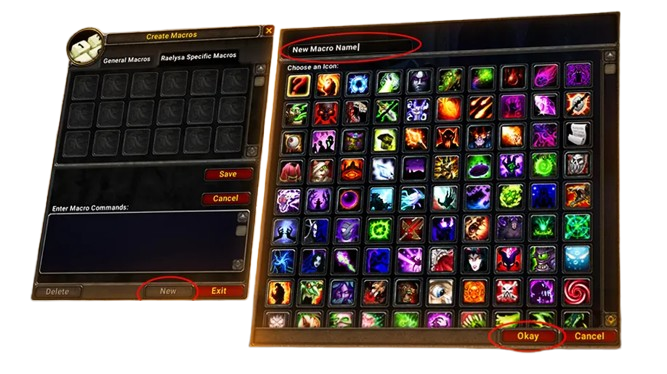
Creating Macros In-Game
Steps to Create Macros:
- Press ESC and click “Macros” or type
/macro - Click “New” to create a macro
- Choose an icon (or use question mark for automatic)
- Name your macro (16 character limit)
- Paste or type macro commands
- Drag macro to action bar
- Use like any other ability
Macro Limitations:
- Maximum 255 characters per macro
- Limited to 18 general macros and 18 character-specific macros
- Some spells cannot be macroed together due to global cooldown
Shapeshifting Macros
All-in-One Form Switching
Universal Shapeshift Macro:
#showtooltip
/cast [form:1] Dire Bear Form; [form:3] Cat Form; [noform] Dire Bear Form
What it does: Single button cycles between Bear and Cat Form. Press while in Bear to shift to Cat, press in Cat to shift to Bear, press in caster form to shift to Bear.
Usage: Simplifies form management during combat, useful for hybrid roles needing quick form transitions.
Smart Power-Shifting (Feral DPS)
Power-Shift Macro:
#showtooltip Cat Form
/cast [nostance:3] Cat Form
/cast [stance:3] !Cat Form
What it does: Shifts you out of Cat Form and immediately back into Cat Form, consuming mana but granting energy from Furor talent.
Usage: Essential for advanced Feral DPS. Use when energy is low and you need immediate energy for Rip or Savage Roar refresh. Requires mana consumables (Dark Runes, Demonic Runes).
Requirements: Furor talent (5/5) in Restoration tree for 40 energy on shift.
Emergency Bear Form
Instant Bear Tank Macro:
#showtooltip Dire Bear Form
/cast Dire Bear Form
/cast Growl
What it does: Shifts to Bear Form and immediately taunts the target.
Usage: Emergency off-tanking when main tank dies or adds spawn. Useful in raids for quick threat pickup on loose enemies.
Travel Form with Ground Mount Alternative
Smart Mount Macro:
#showtooltip Travel Form
/dismount [mounted]
/cast [outdoors,nomod] Travel Form
/use [mod:shift] Reins of the Swift Mistsaber
What it does: Casts Travel Form outdoors normally. Holding Shift uses your epic mount instead (faster than Travel Form at 100% speed).
Usage: Single button for all your movement needs. Travel Form for instant mounting, epic mount for maximum speed when you have time to cast.
Feral DPS Macros
Shred with Auto-Attack
Auto-Attack Shred:
#showtooltip Shred
/startattack
/cast Shred
What it does: Ensures auto-attacks continue between Shred casts, maximizing white damage.
Usage: Replace your normal Shred keybind with this macro. Auto-attacks contribute 15-20% of Feral DPS and should never stop.
Ferocious Bite with Modifier
Smart Finishing Move:
#showtooltip Ferocious Bite
/cast [mod:shift] Rip; Ferocious Bite
What it does: Normal press uses Ferocious Bite. Holding Shift uses Rip instead.
Usage: Saves a keybind by combining both finishing moves. Use Shift-press when Rip needs refreshing, normal press for Ferocious Bite executes.
Pounce from Stealth
Stealth Opener:
#showtooltip Pounce
/cast [stealth] Pounce; Ravage
What it does: Uses Pounce if in stealth, otherwise uses Ravage.
Usage: Single button for stealth openers. Pounce stuns the target from stealth, Ravage deals damage. Simplifies rotation start.
Tiger’s Fury with Notification
Cooldown Announcement:
#showtooltip Tiger's Fury
/cast Tiger's Fury
/run SendChatMessage("Tiger's Fury active - burn phase!", "SAY")
What it does: Activates Tiger’s Fury and announces it to nearby players.
Usage: Useful in coordinated groups to signal DPS burn phases. Remove announcement line for solo play to avoid spam.
Rake with Position Check
Backstab Rake:
#showtooltip Rake
/cast [behind] Shred; Rake
What it does: Attempts Shred if you’re behind the target, otherwise uses Rake.
Usage: Maximizes DPS by prioritizing Shred when properly positioned. Falls back to Rake if positioning isn’t optimal.
Feral Tank Macros
Maul with Auto-Attack
Threat Generation:
#showtooltip Maul
/startattack
/cast Maul
What it does: Ensures auto-attacks continue while using Maul, maximizing threat generation.
Usage: Core tanking macro. Maul is your primary threat generator and should replace your normal Maul keybind.
Swipe with Target Notification
AoE Threat Macro:
#showtooltip Swipe
/cast Swipe (Bear)
/script SendChatMessage("Swiping - hold DPS!", "PARTY")
What it does: Uses Swipe and alerts party members to control DPS during AoE threat generation.
Usage: Useful for dungeon tanking when picking up multiple adds. Communicates threat situation to group.
Bash Interrupt with Mouseover
Quick Interrupt:
#showtooltip Bash
/cast [@mouseover,harm,nodead][] Bash
What it does: Bashes your mouseover target if hostile and alive, otherwise bashes your current target.
Usage: Interrupt caster enemies without changing targets. Essential for multi-target tanking situations.
Challenging Roar with Announce
AoE Taunt Macro:
#showtooltip Challenging Roar
/cast Challenging Roar
/yell Challenging Roar - AoE Taunt!
What it does: Uses AoE taunt and announces it to raid.
Usage: Coordinate with other tanks during raids. Announces usage so other tanks don’t waste their taunts simultaneously.
Frenzied Regeneration Emergency
Self-Heal Button:
#showtooltip Frenzied Regeneration
/cast Frenzied Regeneration
/cancelaura Enrage
What it does: Activates emergency healing and cancels Enrage to reduce incoming damage.
Usage: Press when health drops critically low. Canceling Enrage reduces damage taken, increasing effective healing.
Restoration Healing Macros
Mouseover Rejuvenation
Quick HoT Application:
#showtooltip Rejuvenation
/cast [@mouseover,help,nodead][] Rejuvenation
What it does: Casts Rejuvenation on mouseover target without changing your current target.
Usage: Essential for efficient raid healing. Hover over raid frames and press button to apply HoTs instantly.
Mouseover Regrowth
Emergency Heal:
#showtooltip Regrowth
/cast [@mouseover,help,nodead][] Regrowth
What it does: Casts Regrowth on mouseover target.
Usage: Quick emergency healing without target switching. Maintains tank targeting while healing raid members.
Swiftmend Mouseover
Instant Heal Macro:
#showtooltip Swiftmend
/cast [@mouseover,help,nodead][] Swiftmend
/cast [@target,help] Swiftmend
What it does: Attempts mouseover Swiftmend first, falls back to current target if no mouseover.
Usage: Emergency instant healing. Works with either mouseover or direct targeting for flexibility.
Innervate with Announcement
Mana Support Macro:
#showtooltip Innervate
/cast [@mouseover,help,nodead][] Innervate
/ra Innervating %t - Mana incoming!
What it does: Innervates mouseover target and announces to raid chat.
Usage: Coordinate mana regeneration with healers. Announces target so other healers know who received Innervate.
Rebirth with Communication
Combat Resurrection:
#showtooltip Rebirth
/cast [@mouseover,help,dead][] Rebirth
/ra Combat Ressing %t - Stand by!
What it does: Resurrects dead mouseover target and announces to raid.
Usage: Essential for coordinating combat resurrections. Raid needs to know who’s being resurrected and when.
Nature’s Swiftness + Healing Touch
Instant Burst Heal:
#showtooltip Nature's Swiftness
/cast Nature's Swiftness
/cast [@mouseover,help,nodead][] Healing Touch
What it does: Activates Nature’s Swiftness and casts instant Healing Touch on mouseover target.
Usage: Massive instant healing for preventing deaths. Works as emergency save on any raid member.
Tranquility with Warning
Channeled AoE Heal:
#showtooltip Tranquility
/cast Tranquility
/ra Channeling Tranquility - Don't heal for 10 seconds!
What it does: Channels Tranquility and warns raid to stop healing temporarily.
Usage: Prevents overhealing waste. Raid healers should pause healing to maximize Tranquility efficiency.
Remove Curse Quick Cast
Dispel Macro:
#showtooltip Remove Curse
/cast [@mouseover,help,nodead][] Remove Curse
What it does: Dispels curse from mouseover target.
Usage: Fast curse removal during encounters with curse mechanics (Lucifron, Chromaggus). Essential for raid survival.
Balance Druid Macros
Wrath with Auto-Attack
Ranged DPS Macro:
#showtooltip Wrath
/startattack
/cast Wrath
What it does: Initiates auto-attack (if in range) while casting Wrath.
Usage: Minor optimization for Balance DPS. Auto-attacks rarely matter but contribute small damage when in melee range.
Moonfire with Modifier for Rank
Downranking Moonfire:
#showtooltip
/cast [mod:shift] Moonfire(Rank 10); Moonfire
What it does: Normal press uses max rank Moonfire. Holding Shift uses Rank 10 for mana efficiency.
Usage: Downrank Moonfire in dungeons or farm content where mana efficiency matters more than maximum damage.
Starfire Focus Cast
Priority Casting:
#showtooltip Starfire
/stopcasting
/cast Starfire
What it does: Stops current cast and immediately begins Starfire.
Usage: Interrupt Wrath casts to prioritize Starfire when Nature’s Grace procs or during burn phases.
Hurricane with Position Announce
AoE Damage Macro:
#showtooltip Hurricane
/cast Hurricane
/ra Channeling Hurricane - give me 10 seconds!
What it does: Channels Hurricane and announces to raid.
Usage: Communicates that you’re channeling and need protection. Alerts tank to maintain aggro during AoE damage.
Entangling Roots with Focus
Crowd Control Macro:
#showtooltip Entangling Roots
/cast [@focus,harm,nodead][] Entangling Roots
What it does: Casts Entangling Roots on your focus target without changing main target.
Usage: Maintain CC on focus target while DPSing primary target. Essential for multi-target encounters.
Nature’s Grasp Defensive
Auto-Root Trigger:
#showtooltip Nature's Grasp
/cast Nature's Grasp
/cast [harm,nodead] Moonfire
What it does: Activates defensive root proc and applies Moonfire to current target.
Usage: Single button for defensive setup and continued DPS. Nature’s Grasp procs when enemy hits you in melee.
Utility and Quality of Life Macros
Mark of the Wild Raid Buff
Group Buffing:
#showtooltip Mark of the Wild
/cast [mod:shift,@player] Mark of the Wild; [@mouseover,help,nodead][] Mark of the Wild; Mark of the Wild
What it does: Shift-click buffs yourself, mouseover buffs that target, normal click buffs current target.
Usage: Flexible buffing for various situations. Shift for self-buff, mouseover for raid frames, normal for party members.
Thorns on Tank
Tank Support Macro:
#showtooltip Thorns
/cast [@mouseover,help,nodead][] Thorns
/cast [@focus,help] Thorns
What it does: Casts Thorns on mouseover target, falls back to focus target.
Usage: Set tank as focus, then use this macro to quickly apply Thorns without retargeting.
Barkskin Emergency
Defensive Cooldown:
#showtooltip Barkskin
/cast Barkskin
/cast [form:1] Frenzied Regeneration; [form:3] Dash
What it does: Uses Barkskin plus Frenzied Regen in Bear Form or Dash in Cat Form.
Usage: Emergency survival button. Combines damage reduction with form-appropriate defensive ability.
Faerie Fire (Feral) Threat Reducer
Safe Debuff Application:
#showtooltip Faerie Fire (Feral)
/cast Faerie Fire (Feral)
/cast Cower
What it does: Applies armor reduction debuff and reduces your threat.
Usage: Feral DPS in raids. Apply debuff at fight start, then Cower to prevent threat issues.
Abolish Poison Self-Cast
Self-Dispel Macro:
#showtooltip Abolish Poison
/cast [@player] Abolish Poison
What it does: Instantly dispels poison from yourself.
Usage: Quick self-cleanse during encounters with poison mechanics. Saves time by skipping target selection.
Aquatic Form + Breath Buff
Underwater Macro:
#showtooltip Aquatic Form
/cast Aquatic Form
/cancelaura Aquatic Form
What it does: Toggles Aquatic Form on and off with single button.
Usage: Quickly shift to Aquatic Form for underwater breathing, cancel when returning to land.
Advanced Combination Macros
Feral All-Purpose Combat
Hybrid DPS/Tank Macro:
#showtooltip
/cast [form:1,mod:shift] Challenging Roar; [form:1] Maul
/cast [form:3,mod:shift] Rip; [form:3] Shred
/cast [noform] Wrath
What it does:
- Bear Form: Maul normally, Challenging Roar with Shift
- Cat Form: Shred normally, Rip with Shift
- Caster Form: Wrath
Usage: All-purpose combat button for hybrid builds. Adapts to your current form automatically.
Healing + Shift to Forms
Emergency Shift Heal:
#showtooltip
/cast [form:1] Dire Bear Form; [form:3] Cat Form
/cast [noform,@player] Rejuvenation
What it does: Returns you to your previous form if you’re in caster form after healing, or self-casts Rejuvenation if in caster form.
Usage: After emergency healing, press to return to combat form. Speeds up form transitions.
Battle Rez with Backup Plan
Smart Resurrection:
#showtooltip Rebirth
/cast [@mouseover,help,dead] Rebirth
/cast [@target,help,dead] Rebirth
/cast [@target,help,nodead] Rejuvenation
What it does: Attempts to resurrect mouseover target, then current target, then heals current target if alive.
Usage: Flexible resurrection macro that falls back to healing if no dead targets available.
Stealth + Prowl Detection
Enhanced Stealth:
#showtooltip
/cast [nostealth] Prowl
/cast [stealth] Dash
What it does: Enters stealth normally, uses Dash if already in stealth.
Usage: Single button for entering stealth and moving quickly while stealthed. Useful for PvP and travel.
PvP-Specific Macros
Focus Cyclone
Crowd Control Focus Macro:
#showtooltip Cyclone
/cast [@focus,harm,nodead] Cyclone
/stopmacro [@focus,harm,nodead]
/cast Cyclone
What it does: Cyclones focus target if hostile and alive, otherwise Cyclones current target.
Usage: Maintain CC on focus (usually healer) while DPSing other targets in arena or battlegrounds.
Feral Charge + Root Break
Gap Closer Combo:
#showtooltip Feral Charge
/cast [form:1] Feral Charge (Bear)
/cast [form:3] Feral Charge (Cat)
What it does: Uses appropriate Feral Charge based on current form.
Usage: Single button for gap closing in both forms. Essential for PvP mobility and root breaking.
Root + Shift Out Combo
Escape Macro:
#showtooltip Entangling Roots
/cast [harm,nodead] Entangling Roots
/cast [form:1/3] !Cat Form
What it does: Roots current target and shifts you to caster form (breaking your own roots).
Usage: PvP escape tool. Root enemy, shift out to break your roots, then run away or heal.
Nature’s Grasp + Travel Form
Defensive Travel:
#showtooltip Nature's Grasp
/cast Nature's Grasp
/cast !Travel Form
What it does: Activates defensive roots and enters Travel Form for escape.
Usage: PvP escape button. Nature’s Grasp roots enemies who hit you, Travel Form provides speed to escape.
Macro Organization Tips
Keybind Recommendations
Priority Keybinds (Easily Accessible):
- 1-5: Primary rotation abilities (Shred, Maul, Wrath)
- Shift+1-5: Secondary abilities (Rip, Ferocious Bite)
- Q, E, R, F: Emergency abilities (Barkskin, Swiftmend, Nature’s Swiftness)
- Mouse buttons: Form shifts, high-use macros
Modifier Keys:
- Shift: Alternative abilities (finishing moves, rank variations)
- Ctrl: Utility abilities (buffs, self-heals)
- Alt: Defensive abilities (Barkskin, Frenzied Regen)
Macro Action Bar Setup
Recommended Layout:
- Action Bar 1: Primary form abilities (changes with forms)
- Action Bar 2: Universal abilities (macros that work in all forms)
- Action Bar 3: Healing and utility (doesn’t change)
- Action Bar 4: Cooldowns and situational abilities
Form-Specific Bars: Enable separate action bars for each shapeshift form in Interface Options. This allows different spells per form without macro complexity.
Frequently Asked Questions
Do macros work in all shapeshift forms?
Can I combine multiple spells in one macro?
What are mouseover macros and why use them?
How do power-shifting macros work for Feral DPS?
Can macros automatically select best spell rank?
Are macros allowed or considered cheating?
Conclusion
Mastering Druid macros significantly improves your gameplay efficiency across all specializations. From power-shifting techniques that maximize Feral DPS to mouseover healing that streamlines Restoration raid performance, well-crafted macros reduce keybind clutter and enable faster reaction times during critical moments.
Start by implementing basic macros for your primary spec, then gradually add more advanced combinations as you become comfortable with macro syntax. Focus on macros that solve specific problems in your gameplay rather than creating macros for every ability. The goal is efficiency and convenience, not complexity.
Remember that macros are tools to enhance your performance, not replacements for skill and knowledge. Understanding your class mechanics, encounter strategies, and rotation priorities remains essential. Use macros to execute your knowledge more efficiently, allowing you to focus on positioning, mechanics, and decision-making rather than button management.
For spec-specific rotations and strategies that complement these macros, explore our detailed guides below. Whether you’re healing raids, tanking dungeons, or DPSing as Feral or Balance, proper macro usage elevates your performance to the next level.
May your macros always fire correctly! ⚙️
Related Guides
- Feral DPS PvE Guide – Complete rotation and DPS optimization
- Feral Tank PvE Guide – Tanking strategies and threat management
- Restoration PvE Guide – Healing rotation and raid strategies
- Balance PvE Guide – Caster DPS rotation and spell priorities
- Druid Forms Guide – All shapeshift forms and mechanics
- Druid Talent Calculator – Plan your talent builds
- Main Druid Hub – Complete class overview